Replacing iCloud with a Raspberry Pi 5: OpenMediaVault, RAID, Pi-hole, and WireGuard
- self-hosting
- Raspberry Pi
- OpenMediaVault
- Pi-hole
- WireGuard
- networking
- privacy
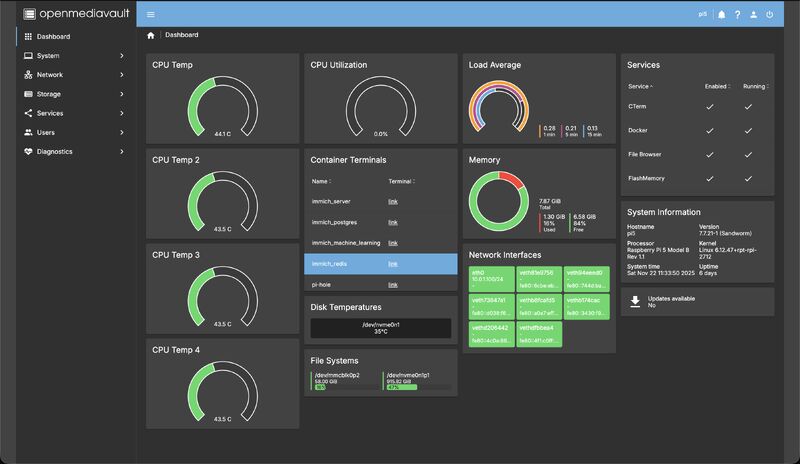
Every month, Google One and iCloud quietly collect rent for storing my own files. As a challenge — and an excuse to actually learn networking, storage, and self-hosting instead of just nodding along — I built a home server that replaces them: a Raspberry Pi 5 running OpenMediaVault, with RAID-mirrored storage, network-wide ad blocking via Pi-hole, and a WireGuard tunnel so all of it works from anywhere.
Here's the architecture, the reasoning, and what I'd tell anyone considering the same jump.
Why the Pi 5 + OpenMediaVault combo
A NAS appliance from Synology does this out of the box — for several hundred dollars and inside a walled garden. The Pi 5 is a fraction of the price, sips power as an always-on device, and the 5th generation finally has the I/O to be a credible file server.
OpenMediaVault (OMV) is the Debian-based NAS distribution that turns the Pi into an appliance without hiding the Linux underneath. It gives you the essentials through a web UI — SMB shares, user management, disk monitoring, scheduled tasks — while leaving you root on a normal Debian system when you need it.
The killer OMV feature for this build: Docker runs happily alongside the NAS duties. The Pi isn't just a file server; it's a small platform. One box, three jobs:
- SMB file shares — media and files, mounted natively on macOS, iOS, and everything else.
- RAID mirroring — two disks, one logical volume; a dead drive is an inconvenience, not a loss. (Worth saying clearly: RAID is redundancy, not backup. It protects against hardware failure, not against deleting the wrong folder — an offsite copy of the irreplaceable stuff is still mandatory.)
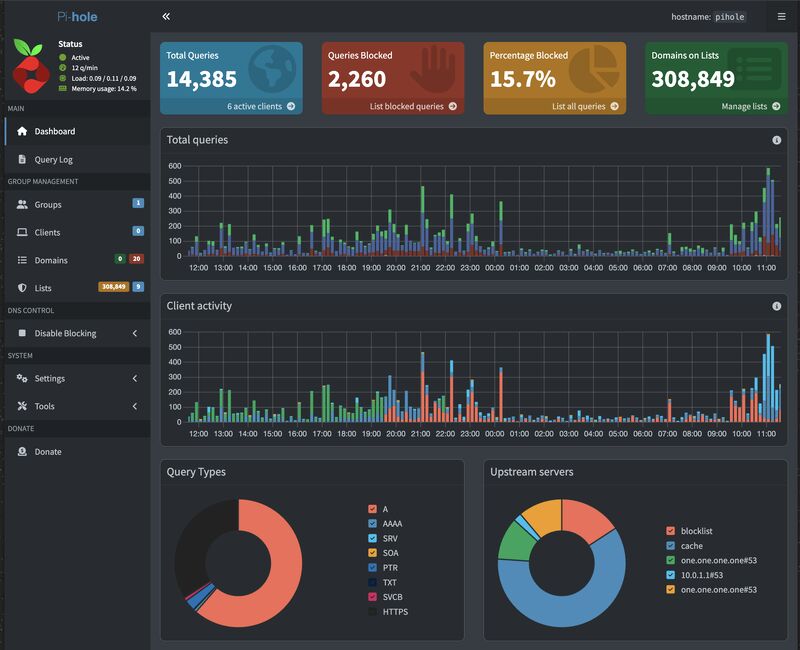
- Docker containers — which is where Pi-hole comes in.
Pi-hole: ad blocking for the whole network
Browser ad blockers work per-device, per-browser. Pi-hole moves the blocking to the DNS layer: it becomes your network's DNS server, and any query for a domain on your blocklist simply doesn't resolve. Ads, trackers, telemetry — refused at the network edge, for every device on the LAN at once, including the ones you can't install extensions on (TVs, consoles, IoT junk).
Running it as a Docker container on the OMV box means the NAS hardware does double duty, and the blocklist is mine — curated, inspectable, with a query log that's genuinely eye-opening the first time you watch what your smart devices phone home to.
WireGuard: taking the network with you
The obvious objection: DNS-level blocking only works while you're on your own network. Step out the door and your phone is back to raw internet.
The answer is WireGuard, which OpenMediaVault supports directly. My phone keeps an always-on WireGuard tunnel back to the Pi, which means:
- DNS still resolves through Pi-hole — ad and tracker blocking works on mobile data and on any café Wi-Fi.
- Public Wi-Fi gets neutralized — traffic rides the encrypted tunnel home before touching the internet, so the sketchy airport network sees nothing but WireGuard packets.
- The SMB shares are reachable remotely — without ever exposing a file server port to the internet. The only thing listening on the WAN is WireGuard's single UDP port, and WireGuard doesn't even respond to packets that fail authentication — to a port scanner, the server looks like nothing at all.
That last property is why WireGuard specifically. The alternative — forwarding ports for each service — is how home servers end up in botnets.
What the project actually teaches
The hardware is the easy part; the learning lives in the plumbing. Building this forces working knowledge of things app developers usually treat as someone else's problem: static leases and DHCP, DNS resolution order, NAT and port forwarding, subnetting your VPN range, filesystem choices, and SMB permission models. Concepts I'd "read about" became things I'd debugged — which is the difference that sticks. The same curiosity that justified the server keeps paying for itself: every new self-hosted service is now just another container on a box I already trust.
Is it worth it over $2.99/month?
Purely financially, it's a wash for years. The real returns are different: my files live on hardware I own; my entire household gets tracker-blocking without installing anything; my phone carries a private network in its pocket; and I understand my own network down to the packet level. The subscription was renting storage. This bought competence.